Motivation
- 沒有使用支援 Certbot plugin 的 DNS provider
- 不想把 DNS provider API key 寫在 server 上
- 不想自動更新 SSL certifications (?!)
- 無法透過 DNS challenge 取得 certifications ( 網管不給改 DNS records 之類的 )
Prerequisite
- Certbot
- Ngnix
- 一個網域
Evnironment
- Ubuntu 22.04.2 (Certbot 2.8.0)
- Windows 10 (Nginx 1.23.3)
Procedure
-
在 Ubuntu 上執行 Certbot
1sudo certbot certonly --manual --preferred-challenges=http -d your.domain -
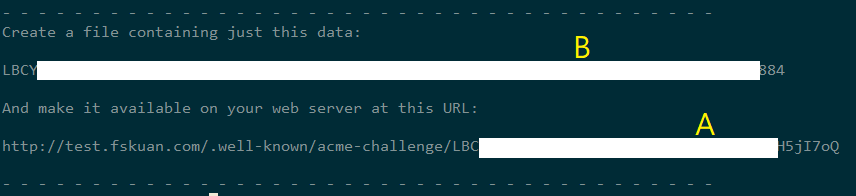
Certbot 會提供兩串文字 (如下圖 A 與 B ),並要求你把這個檔案放在網域的根目錄下
-
在 Windows 上設定 Nginx,讓 Nginx 可以存取到這個檔案,設定內容如下
 1
 2
 3
 4
 5
 6
 7
 8
 9
10
server { listen 80; server_name A.your.domain; # Handle ACME Challenge for Let's Encrypt location ^~ /.well-known/acme-challenge/ { root "C:/nginx-1.23.3/http01/"; # 指定存放 ACME challenge 文件的目录 } } -
實際路徑如下圖,此路徑下放有一個檔案,檔案名稱為 Certbot 產生的 A 字串,其內容為 B 字串
1C:\nginx-1.23.3\http01\.well-known\acme-challenge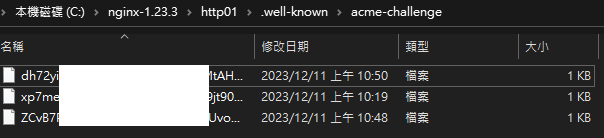
-
在 Step1. 的視窗中按下 Enter,Certbot 會去檢查這個檔案是否存在,如果存在並內容正確就會給你 Certifications
-
Certbot 會把 certifications 存在 Ubuntu 上的
/etc/letsencrypt/live/資料夾下
Summary
由於無法自動更新,此方法較適用於測試站、測試用途。
長期使用的話,建議還是使用 Certbot plugin 自動取得 Certifications。